Valentine Paper Heart PNG Scatters 2: A Practical Resource for Designers and Creators
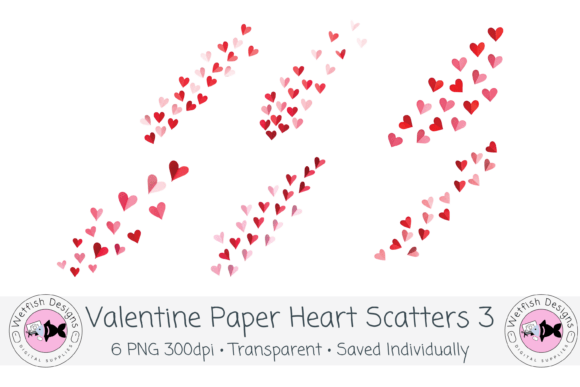
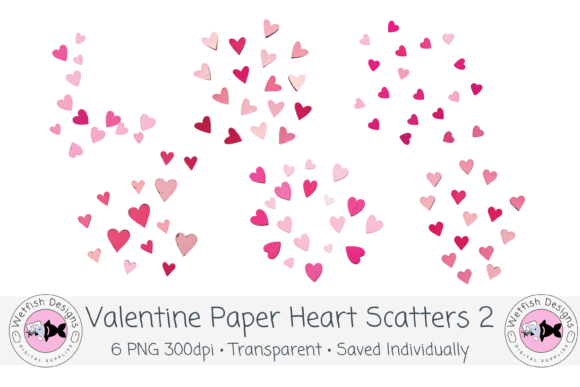
When you are building a library of design assets, the question is rarely whether you need heart-themed elements for Valentine’s Day projects. The question is whether those elements will save you time, hold up under repeated use, and integrate cleanly into the tools you already rely on. Valentine Paper Heart PNG Scatters 2 is a clipart set built with those practical concerns in mind. It includes six individual heart scatter arrangements, each saved as a high-resolution PNG at 300 DPI with a transparent background, styled with a paper-cut aesthetic. The value of this set does not come from novelty alone. It comes from how easily it fits into existing workflows, whether you are designing for print, digital platforms, or physical production with cutting machines.
What the Set Offers and Why It Matters for Your Process
Each scatter in this collection is a standalone PNG file. That means you are not opening a layered file and extracting what you need. You are opening a ready-to-use element that can be dropped directly into a layout, a planner page, a social media graphic, or a sublimation template. The paper-cut style gives the hearts a tactile, handcrafted look that pairs well with both modern and vintage-inspired designs. The transparent background eliminates the need for manual masking or background removal, which is one of the most common friction points when working with clipart in production settings.
The six scatters vary in density and arrangement. Some are tight clusters suitable for corner accents or focal points. Others are more spread out, making them useful as full-page backgrounds or subtle overlays. Having this variety from a single download means you can test different compositions without sourcing additional files or creating custom arrangements from scratch.
Where This Set Fits in a Broader Workflow
Design resources tend to earn their keep at three stages of a project: preparation, assembly, and refinement. Understanding where Valentine Paper Heart PNG Scatters 2 can be inserted at each stage helps you use it more intentionally.
During Preparation and Planning
Before you open any design software, you are likely gathering assets. This is the stage where you decide on a visual direction, test color palettes, and establish a mood. Because the scatters are saved individually, you can open them in a file viewer or a simple preview tool and see exactly how they will look against different backgrounds. If you are designing for a client or a specific product line, you can mock up a quick layout in minutes rather than building heart clusters from individual shapes. The paper-cut texture adds depth even in the planning phase, helping you visualize how the final piece will read.
During the Assembly Phase
This is where the set delivers the most time savings. In software like Canva, Procreate, Adobe Photoshop, or Affinity Designer, you simply import the PNG files and position them. Because the backgrounds are transparent, you can layer the scatters over photos, gradients, patterned papers, or solid colors without any additional work. The high 300 DPI resolution means that even if you scale a scatter up for a poster or a large-format print, the edges remain crisp and the paper-cut detail stays visible.
For users of Cricut or Silhouette machines, the transparent PNG files can be used directly in print-then-cut workflows. Import the scatter into the design software, resize it as needed, and send it to the cutting machine. The paper-cut style is especially fitting here because the final physical product will look like a layered paper creation, which is a popular aesthetic in card making and party decor.
During Refinement and Finalization
After the main layout is complete, you often need small adjustments to balance the composition. A scatter can be duplicated, rotated, or scaled to fill empty space or to draw the eye toward a specific area. Because each file is independent, you can apply layer effects, adjust opacity, or change the blending mode without affecting the rest of your design. If you are producing multiple versions of the same product, such as a set of greeting cards or a series of social media templates, the scatters give you a consistent visual thread across the entire line.
Practical Implementation Tips for Different Platforms and Tools
Getting the most out of Valentine Paper Heart PNG Scatters 2 depends less on the set itself and more on how you manage your assets and use them within your chosen software. Here are some practical observations based on common workflows.
In Canva
Canva users will find these files straightforward to upload. Create a folder in your brand kit or uploads section specifically for heart scatters so you can access them across multiple designs. Because Canva does not always preserve the full resolution of uploaded images when exported, keep an eye on your export settings. If you are designing for print, select PDF Print as your export format to retain the 300 DPI quality. For digital use, PNG export is sufficient. The transparent backgrounds work well with Canva’s background remover, though no additional removal is needed here.
In Procreate
Import each scatter as a new layer. The paper-cut texture becomes more pronounced when you use these elements over painted or textured backgrounds. You can also experiment with layer blending modes like Multiply or Overlay to integrate the hearts more organically into an illustration. Because the files are high resolution, you can zoom in and paint around the edges without losing clarity. If you are creating sticker sheets or planner stickers, the transparent PNGs can be arranged on a canvas, exported as a single sheet, and then cut with a machine or by hand.
For KDP and Print-on-Demand Products
If you publish low-content or medium-content books through KDP, these scatters can serve as decorative accents on chapter pages, title pages, or interior borders. The paper-cut style adds a handmade feel that many readers associate with quality journals and planners. When placing the PNGs into a Kindle Create or InDesign layout, ensure that your export resolution matches the print requirements of the platform. The 300 DPI files are already suitable for print, but resizing them larger than their original dimensions in the layout software can reduce sharpness. Test a sample page before committing to a full interior.
For Sublimation Designers
Sublimation requires clean edges and high contrast, especially when designs are transferred onto polyester fabrics or coated items. The transparent background of these PNGs means you can overlay them onto a sublimation template with zero cleanup. The paper-cut aesthetic works well on items like mugs, tumblers, and apparel because it mimics the look of layered paper or cut vinyl. Keep in mind that sublimation often involves mirrored printing, so position your scatter elements in the layout before flipping the design.
Staying Organized for Long-Term Use
A six-file set is small enough to keep in a single folder, but if you are building a larger library of design assets, a little organization early on prevents wasted time later. Name each file descriptively rather than leaving the default download names. For example, you might rename the files to indicate density, orientation, or primary color direction. This way, when you search your hard drive or cloud storage a year from now, you can locate the exact scatter you need without opening each file.
If you use digital asset management software or a simple tagging system like Finder tags or Windows folders, add keywords such as “Valentine,” “hearts,” “paper cut,” and “scatter.” This makes the set discoverable alongside other seasonal assets. Many creators find that the real value of a clipart set is not in a single use but in its ability to be pulled into projects again and again across multiple years.
Matching the Set to Different Project Types
Not every project needs the same kind of decorative treatment. Knowing which scatter to reach for and when is a small skill that improves over time. For a clean, minimalist card design, you might use a single, less dense scatter positioned in one corner. For a bold, full-bleed pattern, you could tile a larger scatter across the background and reduce its opacity. For sticker sheets, you can combine multiple scatters on one canvas, adjusting scale and rotation to create a varied set of designs.
If you are designing for a small business client who sells handmade goods, the paper-cut style communicates care and craftsmanship. That visual message is harder to achieve with purely vector-based hearts or standard stock clipart. The tactile quality of these scatters bridges the gap between digital convenience and handmade aesthetics.
Quality Control and File Integrity
Before you deploy any asset into a production workflow, it pays to confirm that the file behaves as expected. Open each PNG in your editing software and check that the transparent background is properly preserved. Zoom in to 100% and inspect the edges of the paper-cut lines. High-resolution files at 300 DPI should show clean, aliased or slightly soft edges depending on the original rendering, but there should be no visible compression artifacts or pixelation. Because these files are delivered as individual PNGs, you can also batch process them if needed, applying color adjustments or resizing across all six in software like Photoshop or Affinity Photo.
One practical tip: create a master document in your preferred design tool that contains all six scatters placed on separate layers. Save this as a template file. Whenever you start a new project, you can duplicate this template and hide or show the layers you need. This eliminates the step of importing files one by one each time.
Working With Color Variations and Customization
The Valentine color palette in this set is designed to be versatile, but you are not locked into the original hues. Because the PNG files have transparent backgrounds, you can apply color overlays, gradients, or even texture maps to the heart shapes themselves. In Procreate, you can use the alpha lock feature to paint directly inside the hearts. In Photoshop, you can apply a Color Overlay layer style. In Canva, you can adjust the image filter or duplicate the layer and change the blending mode. This flexibility means the same set can produce warm reds, dusty pinks, or even monochromatic looks depending on the project requirements.
Final Observations on Integration
The most useful design resources are the ones that do not demand extra work. Valentine Paper Heart PNG Scatters 2 fits this description because it delivers finished, high-resolution elements that are ready to place into any layout. The paper-cut aesthetic adds a layer of visual interest that is difficult to achieve quickly with basic shape tools. Whether you are a freelance designer juggling multiple client projects, a small business owner creating your own marketing materials, or a hobbyist building a personal stationery line, this set reduces the gap between the idea in your head and the finished product on your screen. By understanding where it fits in your workflow, how to organize it, and how to adapt it to different tools, you get the most out of a relatively small investment of time and money.