Gaming Devices Coloring Pages Vol 01: A Creative Tool for Learning, Relaxation, and Fun
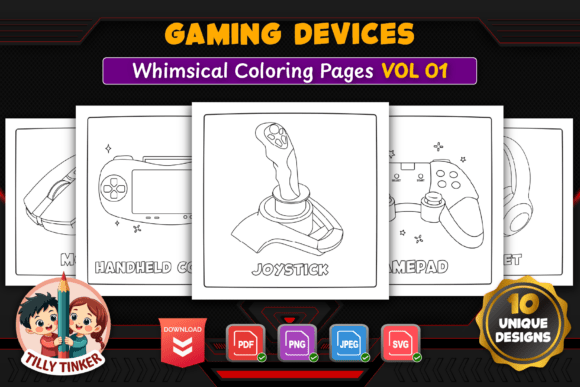
If you have ever tried to explain the difference between a gamepad and a joystick to a room of restless kids, you know that hands-on materials can make all the difference. Gaming Devices Coloring Pages Vol 01 offers exactly that kind of practical resource—a collection of ten simple line illustrations featuring gaming hardware like controllers, keyboards, VR headsets, arcade machines, and more. But this is not just a set of pictures to color. It is a versatile tool that educators, parents, content creators, and even busy adults can adapt to real-life situations without overthinking or prepping. Whether you are planning a classroom activity, building a homeschool lesson, or looking for a low-stress creative outlet, these pages present a straightforward solution that feels more like a natural fit than a chore.
Bringing Technology Concepts to Life in the Classroom
Teachers who cover topics like input devices, gaming history, or simple computer literacy often struggle to find engaging, age-appropriate visuals. Many worksheets rely on photographs that are cluttered with branding and complex angles, making it hard for young students to focus on the essential shapes. The black-and-white line art in this collection strips away those distractions. A gamepad controller becomes a clear set of buttons and triggers; a joystick reduces to its core form; a keyboard shows the familiar WASD cluster without extra clutter.
In a typical fifth-grade tech unit, a teacher might project one page, ask students to identify parts, then let them color while discussing what each device does. The bold outlines mean that even a student who struggles with fine motor control can stay inside the lines. Some teachers have even printed multiple copies and used them as quick formative assessments—students color the mouse in one color if they remember it is an input device, the console in another. The clean design supports these activities without adding busywork for the instructor.
Homeschool Technology Lessons That Actually Stick
Homeschool parents often juggle multiple ages and subjects, and finding ready-to-use materials that do not require hours of prep is invaluable. Gaming Devices Coloring Pages Vol 01 fits naturally into a technology unit for a mixed-age group. A sibling pair might work together: the older child reads a short fact about each device while the younger one colors, or they both fill in a page while listening to a podcast about how consoles evolved.
The square 8.5 × 8.5 inch size makes pages easy to slip into a binder or portfolio. Because the files come in PDF, PNG, JPG, and editable SVG formats, homeschool parents can also resize or edit them. For instance, one parent might reduce the arcade machine page to half size and paste it into a custom worksheet, then add a few fill-in-the-blank lines next to the artwork. The transparent backgrounds in the PNG and SVG files allow layering into other documents or digital whiteboards without ugly white boxes around the device outlines.
Printable Worksheets for Tech Education and Beyond
Beyond formal classrooms, these coloring pages serve as excellent printable worksheets for after-school programs, library makerspaces, and coding camps. A workshop facilitator leading a beginner game design session might hand out the keyboard and WASD pages to help participants visualize the controls they will program. During a break, the coloring activity becomes a calm, social task that keeps everyone engaged without requiring screens.
Consider a scenario at a public library’s “Tech Take‑Apart” event. Kids see real keyboards and mice cut open, then they can color the corresponding pages to reinforce what they learned about internal components. The simple line illustration style means that even volunteers who are not trained in technology can explain the parts just by pointing at the drawing. It becomes a shared visual language that reduces confusion and makes the experience more inclusive.
Adult Relaxation and Mindful Coloring
Adults aged twenty to fifty often look for coloring books that feel relevant to their interests rather than whimsical or juvenile. Gaming-related themes resonate especially with people who grew up playing arcade games, using early consoles, or working with computers. The hand‑drawn quality of these pages—with their easy details and bold outlines—caters to a need for stress relief without the pressure of intricate mandalas or tiny spaces. Coloring a VR headset or a retro arcade machine can evoke nostalgia while providing a quiet, screen‑free activity after a long day of work.
Because the pages are simple, they work well for people with limited time. A developer who spends hours staring at code might only have fifteen minutes to decompress. Filling in the keyboard page with a few colors can shift focus away from work screens. The high‑resolution 300 DPI prints cleanly on standard paper, so there is no need for special supplies—just a set of colored pencils and a printer. The editable SVG format even allows advanced users to import the files into digital coloring apps on a tablet, offering another relaxation option without paper waste.
KDP Interiors and Printable Books for Self‑Publishers
For anyone creating low‑content books on Amazon KDP or selling printable bundles on Etsy, this collection is a plug‑and‑play foundation. The ten pages cover a range of devices that appeal to both kids and adults, which broadens the potential audience. Because the illustrations are simple and bold, they reproduce well in grayscale or color print without losing detail. The square format is a popular size for activity books, and the 300 DPI files ensure crisp edges even when printed at full size.
Self‑publishers can use the editable SVG to add titles, prompts, or decorative borders around each page. For example, one creator might turn the gaming console page into a “Design Your Own Console” activity, adding a few prompts underneath. Another might bundle the pages with a second volume to make a thicker book. The transparent PNGs also allow for easy cover design—drop a controller illustration onto a solid background, add the title, and the cover is ready. This flexibility reduces production time, which is crucial for publishers who want to launch multiple titles quickly.
Practical Considerations Before You Dive In
While these pages are designed for ease, there are a few points worth noting. The illustrations are intentionally simple—if you are looking for highly detailed, photorealistic drawings, this style may feel too minimal. The strength lies in clarity and accessibility, not in intricate shading. Similarly, the square format means that some devices, like a wide keyboard or arcade machine, are scaled to fit within 8.5 × 8.5 inches. This keeps the designs compact and suitable for small hands, but it also means that very fine details (if any) remain large enough to color easily.
Also, because the collection focuses on a specific range of gaming devices, it does not include peripherals like steering wheels, flight sticks, or motion controllers. If your lesson or project needs those, you might use the editable SVG files as a base to create your own variations. The bold outlines make it straightforward to duplicate and modify elements in vector software, turning one page into a template for custom designs.
Another consideration is the audience age. Adults who enjoy coloring as a meditative practice will likely appreciate the clean lines and recognizable subject matter. However, if you are leading a group of older teens or adults who prefer more intricate patterns, these pages may feel too simple. They hit a sweet spot for upper elementary through middle school, and for adults who value quick completion over long‑term projects.
How Different Users Can Make It Their Own
The real value of Gaming Devices Coloring Pages Vol 01 emerges when users adapt it to their specific context. An occupational therapist might use the controller page to help a child with hand strengthening—coloring the buttons one at a time to build finger isolation. A youth group leader could run a “retro gaming night” where kids color arcade machines while waiting for their turn on a real cabinet. A parent of a toddler might simply print the mouse page and let the child scribble, knowing the bold outlines provide enough structure without being rigid.
For tech educators, these pages double as low‑stakes assessment tools. Ask students to color the input devices one color and output devices another (if any in the set). The joystick and gamepad are clear inputs; the VR headset can spark discussion about whether it is input, output, or both. The keyboard and mouse are obvious, but the arcade machine combines a screen (output) and controls (input). These conversations become natural because the coloring activity lowers the intimidation factor of abstract concepts.
Adults who journal or bullet journal can glue in a reduced‑size coloring page as a decorative element. Because the files come with transparent backgrounds, it is easy to overlay text or stickers on top. A gamer might print the WASD page and use it as a bookmark, or frame a completed headset coloring as a small piece of personal art for a desk.
Why This Set Stands Out Among Similar Resources
Many coloring page collections available online were either generated by AI or drawn in a rushed, inconsistent style. This series is hand‑drawn, which gives it a consistent, approachable feel across all ten devices. The lines are uniform in weight, so there are no sudden thin strokes that might frustrate younger colorists. The high‑resolution and multiple file formats are not just marketing points—they genuinely save time for teachers and publishers who need to resize, print, or edit without quality loss.
The choice of devices also reflects current and nostalgic gaming culture. You get the modern VR headset and the classic arcade machine in the same set, which makes it useful for discussions about how gaming hardware has changed. A single volume that spans both retro and contemporary devices reduces the need to buy multiple themed books.
If there is one limitation, it is that the set includes exactly ten pages. Some users might wish for more variety—different controller styles, older consoles, or more peripherals. However, the editable SVG format partially compensates for this, as you can use the existing elements to construct new pages. The collection is best seen as a strong starter pack that handles the most common gaming devices, leaving room for you to expand if needed.
Whether you are a teacher tired of stale worksheets, a parent looking for a screen‑free activity that resonates with your child’s interests, a self‑publisher searching for a reliable interior, or an adult who just wants to color a joystick after a long day, these pages offer a flexible, no‑fuss resource. The real‑world applications are as varied as the people who pick up a colored pencil, and the simplicity of the designs ensures that the focus stays on the experience, not the setup.